NVIDIA H200 vs H100 GPU: Is the Upgrade Worth It for Your Server?
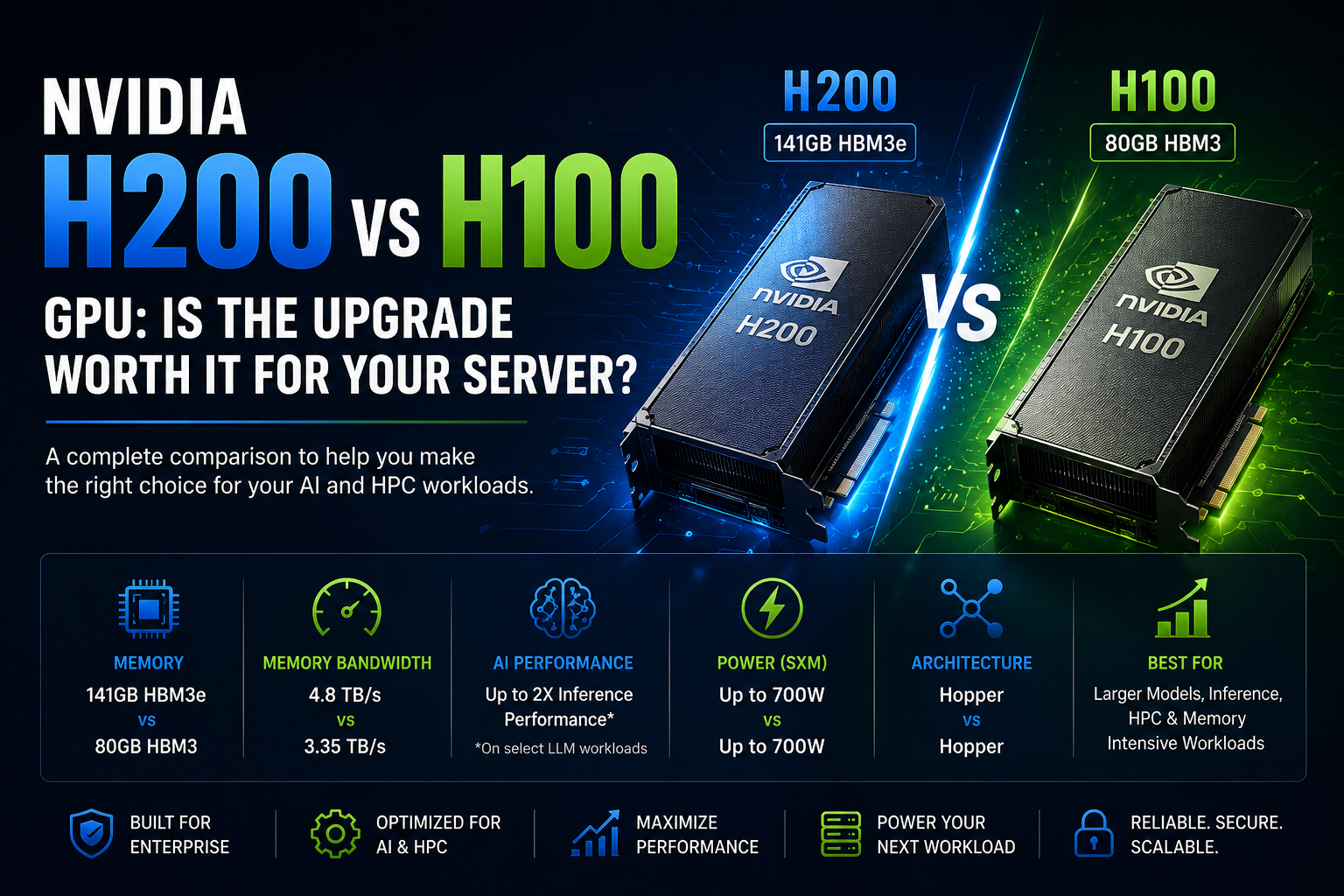
NVIDIA H200 and H100 GPUs are built for demanding AI and HPC workloads. Compare memory, bandwidth, performance, power, server compatibility, and upgrade value before choosing your GPU.
AI servers have changed significantly as businesses move from traditional computing toward large language models, generative AI, machine learning, data analytics, and high-performance computing. For organizations building or upgrading GPU servers, two of NVIDIA's most important data-center accelerators are the H100 and H200 Tensor Core GPUs.
Both are based on NVIDIA's Hopper architecture and support advanced AI workloads, but the H200 takes the platform further with substantially more high-bandwidth memory and higher memory bandwidth. NVIDIA specifies the H200 with 141GB of HBM3e memory and 4.8TB/s of memory bandwidth, compared with 80GB and 3.35TB/s for the H100 SXM.
But does that automatically mean every business should replace its H100 GPUs with H200?
Not necessarily.
The value of the upgrade depends heavily on your workload, model size, memory requirements, server platform, and expected utilization.
H100 vs H200: What Actually Changed?
The H200 isn't a completely new GPU architecture. It builds on the same Hopper foundation used by the H100 while introducing faster and larger HBM3e memory.
This distinction is important.
For many AI workloads, the limiting factor isn't simply GPU compute. Moving large amounts of data between the GPU's memory and processing resources can become a bottleneck. NVIDIA designed the H200 to address this with substantially greater memory capacity and bandwidth.
The headline specifications are:
NVIDIA H100 SXM
- 80GB HBM3
- 3.35TB/s memory bandwidth
- Up to 700W configurable TDP
- 900GB/s NVLink
- Hopper architecture
NVIDIA H200 SXM
- 141GB HBM3e
- 4.8TB/s memory bandwidth
- Up to 700W configurable TDP
- 900GB/s NVLink
- Hopper architecture
The H200 therefore provides 76% more memory capacity than the H100 SXM and roughly 43% more memory bandwidth.
Why H200's Larger Memory Matters
GPU memory is one of the most important considerations when running large AI models.
If a model doesn't fit comfortably into available GPU memory, you may need to distribute it across multiple GPUs or use additional techniques that can introduce communication overhead.
The H200's 141GB memory capacity can allow larger models and datasets to remain within a GPU's high-bandwidth memory.
This can be particularly useful for:
- Large language models
- Generative AI
- AI inference
- Model fine-tuning
- Recommendation systems
- Scientific computing
- Data analytics
- Large-scale simulations
NVIDIA highlights the H200's larger memory as a key advantage for generative AI and HPC workloads.
H200 vs H100 for AI Inference
Inference is one area where the H200 can make a particularly noticeable difference.
Once an AI model is trained, businesses often need to serve thousands or millions of requests. In these environments, memory capacity and bandwidth can have a major impact on throughput.
NVIDIA reports up to 2X inference performance improvements for certain Llama 2 workloads compared with H100, although actual results vary considerably depending on the model, batch size, software stack, and deployment configuration.
The H200's advantage is particularly relevant when the workload is memory-bandwidth constrained.
If your H100 deployment is already delivering the required inference throughput, however, moving to H200 may not provide enough additional business value to justify replacing working hardware.
H200 vs H100 for AI Training
Training large AI models can require enormous amounts of GPU memory and communication bandwidth.
The H100 remains a highly capable training accelerator. Its Hopper architecture includes fourth-generation Tensor Cores, Transformer Engine support, and high-speed NVLink connectivity. NVIDIA lists up to 3,958 TFLOPS of FP8 Tensor Core performance for the H100 SXM with sparsity.
The H200 retains the same headline FP8 Tensor Core figure while providing substantially more memory and memory bandwidth.
This means the H200's primary advantage isn't simply "more compute."
Instead, it can help workloads that are constrained by memory capacity or memory bandwidth.
That distinction should be part of any upgrade decision.
H200 vs H100 for HPC
High-performance computing workloads can also benefit from the H200's memory architecture.
Scientific simulations, computational fluid dynamics, molecular modeling, and other HPC applications can be heavily dependent on memory bandwidth.
NVIDIA has published results showing significant improvements for selected memory-intensive HPC workloads using H200 compared with H100, but actual gains vary by application.
If your HPC applications frequently hit memory-bandwidth limitations, H200 can be a compelling upgrade.
What About H100 NVL?
One important detail is that H100 isn't available in only one configuration.
NVIDIA offers H100 SXM and H100 NVL variants with different memory and power characteristics. The H100 NVL provides 94GB of GPU memory and 3.9TB/s of memory bandwidth, compared with 80GB and 3.35TB/s for H100 SXM.
Therefore, don't compare an H200 simply against "an H100" without identifying the exact model.
The server form factor also matters because SXM and PCIe implementations have different system requirements.
Power and Server Compatibility
GPU upgrades aren't as simple as removing an H100 and installing an H200.
The server must support the specific GPU form factor, power requirements, cooling design, firmware, PCIe or NVLink configuration, and GPU density.
The H200 SXM can operate at up to 700W configurable TDP, while the H200 NVL is listed at up to 600W. NVIDIA also specifies HGX H200 systems with four or eight GPUs and H200 NVL configurations with up to eight GPUs.
Before upgrading, check:
- Server model
- GPU form factor
- GPU power requirements
- Power supply capacity
- Cooling capability
- PCIe slot configuration
- NVLink compatibility
- Firmware
- NVIDIA-certified system support
A GPU upgrade should always be evaluated as a complete server platform decision, not just a graphics-card replacement.
Should You Upgrade From H100 to H200?
Upgrade to H200 if:
- Your models are approaching the H100's memory limit.
- Your workloads are memory-bandwidth intensive.
- You need higher inference throughput.
- You're building a new AI server.
- You're running large LLMs.
- Your HPC applications are memory constrained.
- You want greater GPU memory without immediately increasing GPU count.
Stay with H100 if:
- Your existing AI workloads already meet performance targets.
- GPU memory isn't a bottleneck.
- Your applications are primarily compute-bound.
- Your H100 servers have significant remaining lifecycle.
- An upgrade would require expensive server-level changes.
- The additional performance wouldn't materially improve your business results.
H200 vs H100: Which GPU Is Better for Your Server?
There isn't one answer for every organization.
The H100 remains an extremely capable enterprise GPU and continues to make sense for many AI training, inference, HPC, and analytics deployments. Its Hopper architecture, Tensor Cores, Transformer Engine, and high-speed NVLink make it suitable for demanding multi-GPU systems.
The H200 is the stronger choice when memory capacity and bandwidth are important. Its 141GB HBM3e and 4.8TB/s bandwidth can provide meaningful advantages for large models and memory-intensive workloads.
For a new server purchase in 2026, H200 can therefore be an attractive option when the workload can take advantage of its additional memory.
For an existing H100 server, however, the upgrade decision should be based on measured workload performance rather than specifications alone.
Final Verdict
NVIDIA H200 is not simply a faster H100. Its biggest advantage is having significantly more and faster GPU memory.
That makes H200 particularly attractive for large AI models, inference workloads, and memory-intensive HPC applications.
If your H100 deployment is already performing well, there may be little reason to replace it immediately. But if you're running into GPU memory limitations, experiencing memory-bandwidth bottlenecks, or building a new server for large-scale AI, H200 can provide a meaningful step forward.
The smartest approach is to benchmark your actual workload and calculate the performance gained per dollar, per watt, and per server before making the investment.
Choose H200 when your workload needs its memory advantage. Choose H100 when it already delivers the performance your business requires.
Frequently Asked Questions
Is NVIDIA H200 better than H100?
For workloads that benefit from GPU memory capacity and bandwidth, H200 has a significant advantage. H200 provides 141GB HBM3e and 4.8TB/s bandwidth, while H100 SXM provides 80GB HBM3 and 3.35TB/s.
Is H200 worth upgrading from H100?
It can be worth upgrading when your workload is limited by GPU memory or memory bandwidth. If your H100 system already meets your performance requirements, the upgrade may not provide sufficient return on investment.
How much GPU memory does NVIDIA H200 have?
The NVIDIA H200 provides 141GB of HBM3e memory in both the H200 SXM and H200 NVL specifications listed by NVIDIA.
How much memory does NVIDIA H100 have?
The H100 SXM has 80GB of HBM3 memory. NVIDIA's H100 NVL variant provides 94GB per GPU.
Which is better for large language models, H100 or H200?
H200 is particularly attractive for large language models because its larger memory capacity can allow more model data to remain in GPU memory, while its higher bandwidth can improve memory-intensive workloads.
Is H200 better for AI inference?
H200 can provide substantial inference improvements on certain large-model workloads. NVIDIA reports up to 2X inference performance compared with H100 for selected Llama 2 workloads, but real-world results depend on the model and configuration.
Can I replace an H100 with an H200 in my existing server?
Not automatically. Compatibility depends on the server platform, GPU form factor, power, cooling, firmware, and interconnect configuration. Check the server manufacturer's supported GPU list before upgrading.
Which should I buy for a new AI server in 2026?
If you're building a new server for large LLMs, generative AI, or memory-intensive HPC, H200 is worth serious consideration. For workloads that don't need its additional memory and bandwidth, H100 can still be a strong option.
Is H100 still a good GPU for AI servers?
Yes. H100 remains a powerful Hopper-based data-center accelerator with strong Tensor Core performance, NVLink connectivity, and support for demanding AI and HPC workloads.
What should I check before buying an H200 server?
Check GPU configuration, memory requirements, server certification, power supplies, cooling, GPU form factor, NVLink/NVSwitch requirements, networking, storage, and the software stack required for your AI workload.