Physical Server vs Virtual Server: Which Is Better for Business?
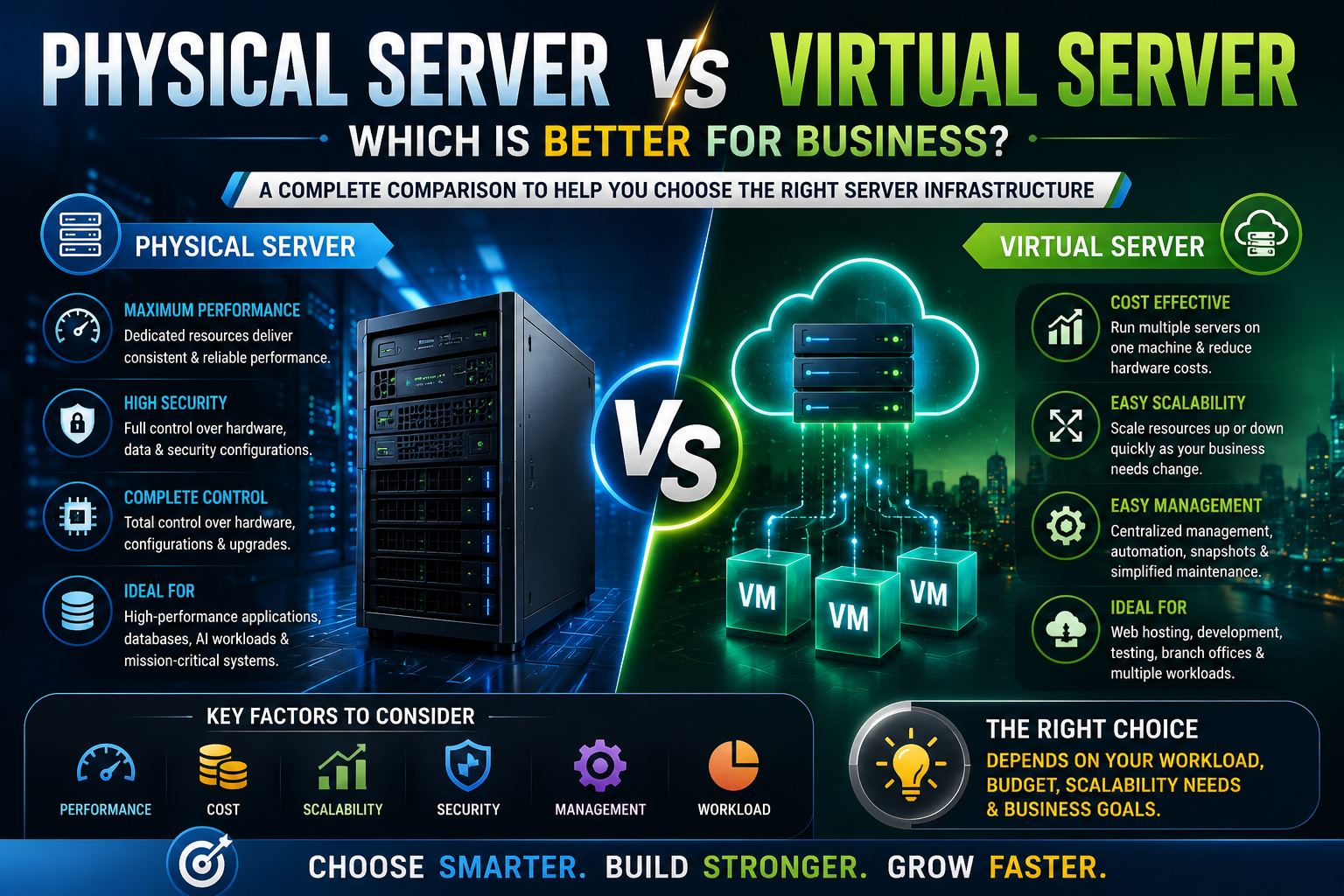
Physical and virtual servers offer different advantages for businesses. Compare performance, cost, scalability, security, maintenance, and workloads to choose the right server infrastructure.
Choosing the right server infrastructure is an important decision for any growing business. Whether you're running business applications, databases, websites, file storage, or virtualization, the underlying server environment can affect performance, scalability, maintenance, and long-term IT costs.
Two common approaches are physical servers and virtual servers.
A physical server gives you dedicated hardware resources, while a virtual server uses software to create one or more independent virtual machines on a physical host.
Neither option is automatically better for every business.
The right choice depends on your workload, budget, performance requirements, security needs, expected growth, and IT management strategy.
In this guide, we'll explain the differences between physical and virtual servers and help you understand when each option makes sense.
What Is a Physical Server?
A physical server is a dedicated piece of hardware with its own processor, RAM, storage, networking components, and operating system.
For example, an organization might deploy an HPE ProLiant or Dell PowerEdge server specifically for its business applications.
The hardware resources belong directly to that server and aren't normally shared with other virtual machines.
A physical server can be used for:
- Databases
- Business applications
- File storage
- Backup
- Web hosting
- Virtualization
- AI workloads
- High-performance computing
- Specialized applications
Physical servers are particularly useful when an application needs predictable and dedicated hardware resources.
What Is a Virtual Server?
A virtual server, commonly called a virtual machine (VM), is a software-defined server running on a physical host.
A virtualization platform creates multiple virtual machines on the same physical hardware.
For example, one physical server with sufficient CPU, RAM, and storage could host separate virtual machines for:
- Database applications
- File services
- Web applications
- Development
- Monitoring
- Internal business software
Each VM operates as an independent environment even though multiple VMs share the underlying physical hardware.
This allows businesses to use their server resources more efficiently.
Physical Server vs Virtual Server: The Main Difference
The simplest way to understand the difference is:
Physical server: One operating environment runs directly on dedicated hardware.
Virtual server: Multiple independent operating environments can run on the same physical hardware through a hypervisor or virtualization platform.
Virtualization therefore adds an additional software layer between the physical hardware and the virtual machines.
That layer provides flexibility, but the physical host still determines the total resources available.
Performance: Which Is Faster?
When comparing a single physical server with a virtual machine running on that same hardware, the physical environment can provide more direct access to hardware resources.
However, modern virtualization platforms can deliver very strong performance, and the performance difference may be small enough that virtualization is the better overall choice for many business workloads.
Performance depends on:
- CPU allocation
- RAM allocation
- Storage performance
- Network configuration
- Number of VMs
- Workload type
- Hypervisor configuration
- Resource contention
For extremely latency-sensitive or hardware-intensive workloads, a dedicated physical server can be preferable.
For typical business applications, properly configured virtualization can provide excellent performance while offering much greater flexibility.
Cost: Physical vs Virtual Servers
Cost is more complicated than simply comparing the price of one physical server with one virtual machine.
With physical infrastructure, you may need dedicated hardware for each application.
For example, if you have five applications and each requires its own server, you could potentially need five physical systems.
With virtualization, those applications could potentially run as separate VMs on fewer physical hosts.
This can reduce:
- Hardware purchases
- Rack space
- Power consumption
- Cooling requirements
- Hardware maintenance
- Data-center space
However, virtualization also introduces costs related to virtualization software, licensing, management, storage, backup, and potentially more powerful host hardware.
The most cost-effective approach depends on your environment.
Scalability: Which Is More Flexible?
Virtualization generally has an advantage when it comes to quickly changing resource requirements.
A VM can often be configured with additional virtual CPU cores, RAM, or storage without purchasing a completely new physical server.
For example, if a business application grows from requiring 8GB of RAM to 32GB, administrators may be able to allocate additional memory to the VM, assuming the physical host has sufficient resources.
Physical servers can also be upgraded, but hardware expansion may require compatible DIMMs, processors, storage, network cards, or other components.
For businesses expecting changing workloads, virtualization can therefore provide valuable flexibility.
Hardware Utilization
One of the biggest advantages of virtualization is improved hardware utilization.
A physical server running only one lightweight application might use a relatively small percentage of its available CPU and memory capacity.
Virtualization allows other workloads to use the remaining resources.
For example, one powerful physical server could potentially host several VMs instead of running a single application.
This can make better use of the hardware investment.
However, virtualization doesn't eliminate resource limitations.
If too many VMs are placed on a physical host, CPU, RAM, storage, or network contention can negatively affect performance.
Good capacity planning remains essential.
Security Considerations
Both physical and virtual environments can be secure when properly designed and managed.
The security difference isn't simply "physical is secure and virtual is insecure."
In a virtual environment, administrators need to secure:
- Physical hosts
- Hypervisors
- Virtual machines
- Management interfaces
- Virtual networks
- Storage
- Backup systems
- Administrative accounts
Physical servers also require strong operating-system, network, application, access-control, and firmware security.
Virtualization can provide useful isolation between workloads, but a compromised host or poorly secured virtualization-management environment can affect multiple VMs.
Security should therefore be designed at both the infrastructure and application levels.
Maintenance and Management
Virtual environments can simplify certain management tasks.
Instead of managing numerous physical servers independently, IT teams can manage multiple VMs from centralized virtualization-management tools.
Virtual machines can also make tasks such as:
- Provisioning
- Cloning
- Testing
- Migration
- Backup
- Resource allocation
more convenient.
Physical servers may require more direct hardware management.
However, physical infrastructure has fewer virtualization layers to manage, which can be an advantage for organizations running simple environments.
Backup and Disaster Recovery
Virtualization can be particularly useful for backup and disaster-recovery strategies.
VMs can often be backed up as complete virtual workloads, making it easier to restore an application environment.
Virtualization can also support strategies where workloads are moved between physical hosts, depending on the platform and configuration.
However, virtualization isn't itself a backup.
A VM stored on one physical server can still be lost if that server, its storage, or the surrounding infrastructure fails.
Businesses should maintain an independent backup strategy and, for critical workloads, consider geographically separate or otherwise resilient copies.
When Should You Choose a Physical Server?
A physical server can be the better option when your workload requires dedicated resources or specialized hardware.
Consider a physical server when you need:
High and predictable performance
Some workloads benefit from dedicated CPU, RAM, storage, or network resources.
Large databases
High-performance database environments may benefit from dedicated hardware and carefully optimized storage.
GPU workloads
AI, machine learning, rendering, and other accelerator-intensive applications can require dedicated GPU hardware.
Specialized applications
Some applications have specific hardware or licensing requirements that make virtualization less suitable.
Maximum hardware control
Organizations that need direct control over hardware configuration may prefer physical infrastructure.
When Should You Choose a Virtual Server?
Virtualization is particularly attractive when flexibility and resource efficiency are priorities.
A virtual server can be a strong option for:
- Business applications
- Development environments
- Testing
- Web servers
- Application servers
- Internal services
- Small databases
- Multiple workloads on one host
- Disaster recovery
- Rapid server provisioning
If your business needs several independent server environments but doesn't want separate physical hardware for each one, virtualization can provide significant advantages.
Can You Use Physical and Virtual Servers Together?
Yes—and many businesses do.
You don't necessarily need to choose one technology for everything.
A hybrid server infrastructure can use physical servers for demanding or specialized workloads while using virtualization for general business applications.
For example:
Physical server:
High-performance database or GPU workload.
Virtual machines:
Web server, application server, monitoring system and development environment.
This approach allows businesses to match infrastructure with workload requirements instead of forcing every application into the same architecture.
Physical Server vs Virtual Server for Small Businesses
For a small business, virtualization can be particularly useful when several applications need to run but the organization doesn't want multiple physical servers.
A single properly configured server could potentially host several VMs.
However, small businesses should also consider the importance of that physical host.
If multiple critical VMs run on one physical server, failure of that server could affect several applications simultaneously.
For important workloads, businesses should consider redundancy, backups, replacement hardware, and disaster recovery.
Physical Server vs Virtual Server for Enterprise Businesses
Larger organizations often use both technologies.
Enterprise environments may use virtualization clusters for general-purpose workloads while deploying dedicated physical infrastructure for applications that require specialized performance.
The decision is usually based on:
- Workload requirements
- Availability
- Performance
- Security
- Hardware compatibility
- Licensing
- Data-center architecture
- Disaster recovery
- Future expansion
At enterprise scale, the question isn't always physical vs virtual.
It's often where should each workload run?
Physical Server vs Virtual Server for AI and GPU Workloads
AI workloads deserve special consideration.
Machine learning and generative AI applications may require high-performance GPUs, large amounts of GPU memory, high-speed networking, and specialized cooling.
A physical GPU server can provide direct access to dedicated accelerator hardware.
Virtualization can still be used in certain GPU environments through technologies designed for GPU sharing or passthrough, depending on the GPU, virtualization platform, and workload.
For demanding AI training environments, however, infrastructure should be designed around the specific GPU architecture and communication requirements.
If you're purchasing an NVIDIA H100, H200, or another high-end accelerator, verify the complete server's GPU compatibility, power, cooling, PCIe configuration, and interconnect capabilities.
Which Is Better for Your Business?
There isn't one universal answer.
Choose a physical server when dedicated performance, specialized hardware, maximum control, or predictable resources are important.
Choose a virtual server when flexibility, consolidation, rapid provisioning, and efficient hardware utilization are priorities.
Choose a hybrid approach when your organization has a mixture of workloads.
The most important step is to evaluate each application rather than selecting an infrastructure model based purely on cost or technology trends.
Final Verdict
Physical and virtual servers are not competing technologies in every situation—they often complement each other.
A physical server gives businesses dedicated hardware resources and can be the right choice for demanding databases, GPU workloads, specialized applications, and environments where predictable performance is critical.
Virtual servers provide flexibility and allow multiple workloads to share physical resources. This can reduce hardware requirements and make provisioning, management, backup, and scaling easier.
For many businesses in 2026, the best strategy is a balanced infrastructure that combines physical and virtual servers based on workload requirements.
Before buying a server, consider your applications, CPU requirements, RAM, storage, networking, security, availability, expected growth, and budget.
Don't choose physical or virtual simply because one is newer or more popular. Choose the infrastructure that fits the workload.
Frequently Asked Questions
What is the difference between a physical server and a virtual server?
A physical server is dedicated hardware running an operating system directly on the machine, while a virtual server is a software-defined server running on a physical host through virtualization technology.
Is a physical server faster than a virtual server?
A physical server can provide more direct access to hardware resources, but properly configured virtual machines can deliver excellent performance. The actual difference depends on the workload and server configuration.
Is a virtual server cheaper than a physical server?
Virtualization can reduce costs by allowing multiple workloads to share the same physical hardware. However, software licensing, management, storage, and host hardware costs should also be considered.
Are virtual servers secure?
Yes. Virtual servers can be highly secure when the host, hypervisor, virtual machines, network, storage, and management interfaces are properly configured and maintained.
Which is better for a database, physical or virtual server?
It depends on the database workload. Large, performance-sensitive databases may benefit from dedicated physical resources, while many business databases can run effectively on well-designed virtual infrastructure.
Can multiple virtual servers run on one physical server?
Yes. A physical server can host multiple virtual machines as long as it has sufficient CPU, RAM, storage, networking, and virtualization-platform capacity.
Is virtualization good for small businesses?
Yes. Virtualization can allow a small business to consolidate multiple applications onto fewer physical servers, potentially reducing hardware, power, and management requirements.
Should I use a physical server for AI?
High-performance AI workloads often benefit from dedicated GPU servers. Whether virtualization is appropriate depends on the GPU, virtualization platform, application, and performance requirements.
Can a physical server run virtual machines?
Yes. A physical server can act as a virtualization host and run multiple virtual machines using a suitable hypervisor.
Should a business use physical and virtual servers together?
Yes. A hybrid approach can be effective when some workloads require dedicated hardware while others benefit from virtualization and resource consolidation.
How do I choose between a physical and virtual server?
Start by evaluating your workload's CPU, RAM, storage, GPU, networking, performance, security, availability, scalability, and budget requirements. Then choose the infrastructure that best matches those needs.